How to get AI to write an email that doesn't sound like AI
AI writes a perfectly correct email that everybody can tell was written by a machine. The fix is not a better AI — it is three lines added to what you ask for, and you can copy them below.
about 5 minutes · written by Robert Prime · recommendation from our emails & letters board, updated 14 Aug 2026
By the end of this you will have
- An email that reads like you wrote it in a hurry, which is what a real email reads like
- A reusable prompt you keep in your notes and paste every time
- A way to spot the four words that give the game away before you press send
Which AI to use for this
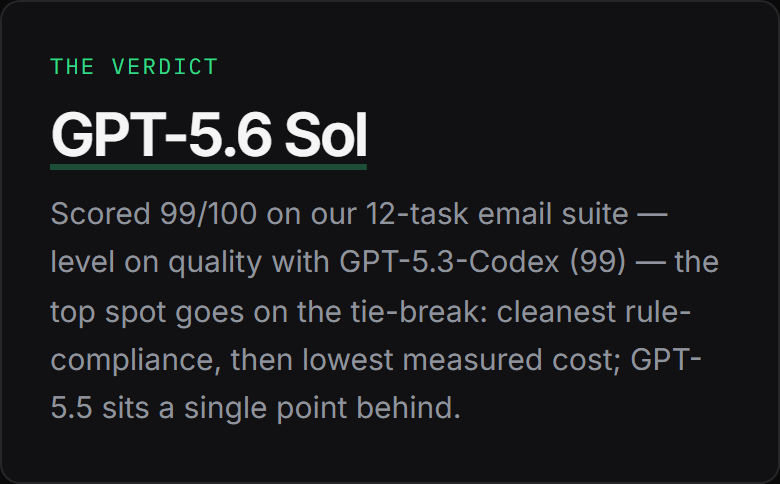
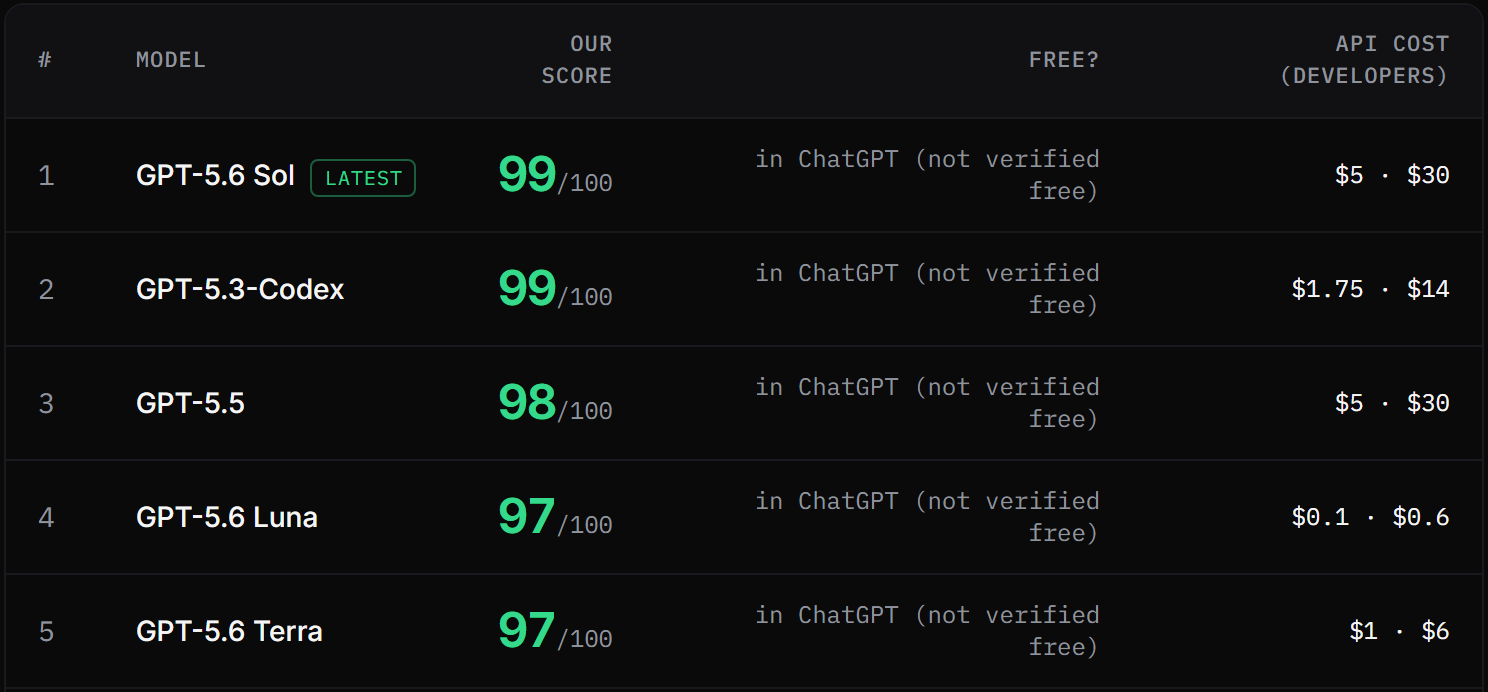
GPT-5.6 Sol tops our emails & letters board with 99/100 across 12 tasks, marked blind by judges from three rival labs. You do not install it or sign up for anything unusual — it is the engine inside ChatGPT (chatgpt.com) ↗, and the free tier is enough to start.
Already pay for something else? GPT-5.3-Codex (99) and GPT-5.5 (98) came next on the same tasks. 3 of the 19 we tested finished within a single point of the top, so the steps below matter more than which of them you open.
Step by step
- 1
Open the AI and start a new chat
A new chat each time. If you carry on in yesterday's conversation the AI keeps yesterday's tone, and you spend longer arguing with it than writing the email yourself.
- 2
Give it the facts, not the vibe
The single biggest cause of AI-sounding email is a vague request. "Write a professional email about the rent" gets you professional-sounding nothing. Give it the facts and it has something real to say.
Paste thisWrite an email from me to a tenant. Facts: - Rent for August is 11 days late - Amount owed: 940 - They have paid on time for three years - I want the money by Friday, or a phone call to agree a date Write it as if I dictated it to you.
Swap the four facts for yours. Keep them as a list — a list of facts beats a paragraph of description every time.
- 3
Ban the tells
There is a short list of phrases that only appear in AI writing and press releases. Ban them by name in the same message and the whole register changes. Paste this straight after the facts.
Paste thisRules: - Under 90 words - No "I hope this email finds you well" - No "reach out", "circle back", "touch base", "delve" - No exclamation marks - No em dashes - Plain British English, contractions allowed - End with one specific next step, not a pleasantry
The word cap is doing more work than any of the others. Short email, human email — length is where the padding hides.
- 4
Read it out loud once
Out loud, not in your head. If you would not say a sentence to the person's face, delete it. This catches about nine tenths of what is left, and it takes fifteen seconds.
- 5
Fix it in one instruction, not five
If it is still off, do not rewrite the whole prompt. Tell it what is wrong in one line and it will keep the good parts.
Paste thisToo formal. Say it the way I would say it on the phone. Same facts, same length.
Other one-liners that work: "Cut the first sentence, it's throat-clearing." "Make the ask harder." "Take out anything I wouldn't say out loud."
What a good answer looks like
Not a made-up example. This is one of the emails & letters tasks from our published suite, and what GPT-5.6 Sol actually wrote when it sat it — printed exactly as it was stored, with the mark the judges gave it.
One thing to know before you read it: it was marked against the rules that task sets, which are not the rules on this page. A test suite has to stay identical for every model that sits it, so it cannot adopt the tighter prompt above. Read the answer for the shape of a good one — facts early, constraint respected, a clear next step — not as a template to copy.
Write an email chasing invoice #1042, now 21 days overdue, to a long-standing client. Firm but warm, under 110 words, must state the amount is £1,840, must not use the word 'unfortunately', and must end with one specific next step.
**Subject: Invoice #1042 – Payment Overdue**

Hi [Name],

I hope you’re well. I’m following up on invoice #1042 for £1,840, which is now 21 days overdue.

We greatly value our long-standing relationship and appreciate your prompt attention to this. If payment has already been made, please send the remittance details so we can update our records.

Please reply today confirming the payment date.

Best,
[Your Name]
Judge, marking blind: The response perfectly follows all instructions. It is firm but warm, well under the word limit, includes the correct invoice details and amount, avoids the forbidden word, and ends with a clear, specific next step.
- It states the amount and the number of days without a run-up — the facts are in the first two lines, where a real email puts them
- It never says "unfortunately", which the task banned; our test harness checks that in code rather than trusting a judge to notice
- It ends with one specific thing to do next, so the recipient knows what closing the email costs them
Common mistakes
Asking for "a professional email".
Professional is the default and it is the problem. Ask for the email you would actually send, and give it a word limit.
Letting it invent the details you did not give it.
If you did not tell it the amount, it will make one up and it will look plausible. Check every number and every date against your own records before sending. Always.
Pasting a tenant's or client's personal details into a free AI account.
Use initials, or "the tenant". Most of these companies keep what you type, and some train on it. Nobody needs a real name to write a good email.
Accepting the first draft because it looks tidy.
Tidy is what it is good at. The second draft, after one blunt instruction, is where it starts sounding like you.
Why there are no screenshots of ChatGPT here
We do not hold accounts with OpenAI, Google or Anthropic, so we cannot take an honest screenshot of their screens — and building a convincing mock-up of one would be exactly the sort of invention this site exists to argue against. The images above are our own published board, which we can show you every pixel of and which you can check yourself. The steps are written so they work whichever of these tools you open, because the words you type matter far more than the buttons around them.
Questions people ask
Will people be able to tell it was written by AI?
Not if you give it real facts, cap the length and ban the stock phrases. What people spot is not AI — it is padding, false warmth and a paragraph that says nothing. Remove those and there is nothing left to spot.
Do AI detectors work?
Not reliably, in either direction. They flag human writing as AI and miss AI writing regularly, and no detector we know of publishes an error rate you could act on. Write the email properly and do not think about detectors.
Is it safe to paste a customer's email into an AI?
Assume anything you type could one day be read by a stranger. Several of these companies use what you type to improve their models unless you turn it off in settings. Strip out names, addresses, account numbers and anything medical or financial before you paste.
How to make AI writing sound human
How to write a cover letter with AI
All guides → · The tested emails & letters ranking → · How we test → · Every tool and what it costs →