How to actually do things with AI
Not “10 amazing AI prompts”. Each of these is one job, done start to finish, in plain English — with the exact words to paste, what a good answer looks like, and the mistakes that waste your afternoon.
And when a guide tells you which AI to use, it is not a guess. Every one is tied to a board where that AI sat a published exam against the same tasks as everything else, marked blind by judges from three rival labs. The winner shown on each guide is read from our database when the page is built, so it moves when the ranking moves.
8 guides · written by Robert Prime · every recommendation traced to a tested board
How to get AI to write an email that doesn't sound like AI
AI writes a perfectly correct email that everybody can tell was written by a machine. The fix is not a better AI — it is three lines added to what you ask for, and you can copy them below.
5 min · tested pick: GPT-5.6 Sol (99/100)
How to use AI in Excel and Google Sheets
You do not need to learn formulas. You need to describe your spreadsheet accurately enough that the AI can write the formula for you — and then check it, because a confident wrong formula costs real money.
10 min · tested pick: GPT-5.6 Luna (98/100)
How to turn messy notes into revision flashcards
Most AI flashcards are useless because they tell you the answer inside the question. Getting good ones is a matter of three rules you state up front — and this works just as well for a professional exam as for GCSEs.
10 min · tested pick: GPT-5.6 Sol (98/100)
How to tailor your CV to a job ad with AI
Sending the same CV to twenty jobs is why you hear nothing back. Tailoring it takes about ten minutes per application with AI — and there is one rule that matters more than every prompt on this page: it may not add anything you have not done.
12 min · tested pick: GPT-5.5 (95/100)
How to summarise a long document with AI
A summary that drops a caveat is worse than no summary, because you act on it. The trick is to say what the summary is FOR, and to ask two questions afterwards that catch what went missing.
8 min · tested pick: Claude Opus 4.8 (99/100)
How to plan a trip with AI
AI is genuinely good at the shape of a trip — what fits in a day, what order to do things in, whether your budget is realistic. It is bad at anything that changes: prices, opening times, whether a hotel still exists. Use it for the first and check the second.
15 min · tested pick: GPT-5.6 Sol (94/100)
How to write a cover letter with AI
A cover letter that restates your CV wastes the only page where you get to argue. This is how to get AI to build the argument — from your experience, not from a template it has seen ten thousand times.
10 min · tested pick: GPT-5.5 (98/100)
How to make AI writing sound human
There is a specific set of things that make writing sound like AI, and once you can name them you can ban them. The harder half of the job is keeping every fact intact while you do it — which is what separates rewriting from mangling.
6 min · tested pick: GPT-5.3-Codex (97/100)
Why our “use this one” is worth reading
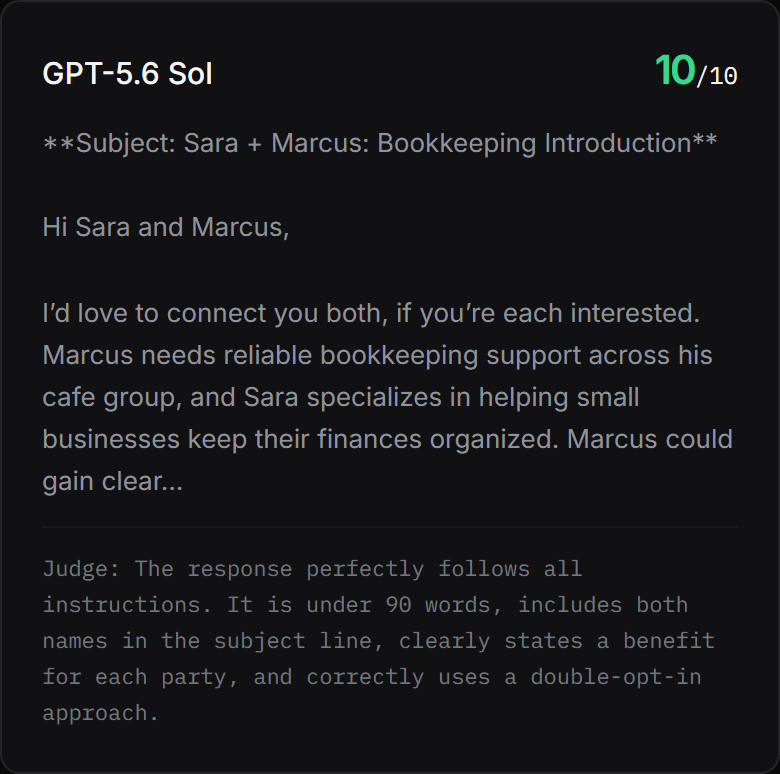
Most how-to pages recommend whatever the writer happens to use. Ours name the model that won a published board — and every score on those boards links the raw answer and the judge’s own words. This is one real answer, to one real task, with the mark it got:
How we test → · The full protocol → · Head-to-head comparisons →
Questions people ask
What is different about these guides?
Every one of them ends up recommending an AI, and every recommendation points at a board where that AI sat a published exam against the same tasks as everything else. The winner named on a guide is read out of our database when the page is built, so it cannot go stale while the ranking moves underneath it.
Do I need to pay for anything to follow them?
No. Every guide is written to work by typing into a normal AI chat window, and the free tier of the major chat tools is enough for all of it. Where a board has verified a genuinely free route to the winning model, the guide says so and links the vendor page we checked.
Do you show screenshots of ChatGPT and the other tools?
No, and that is deliberate. We hold no accounts with these companies, so we cannot take an honest screenshot of their screens — and mocking one up would be a fabrication. The screenshots on these pages are of our own published boards and receipts, which we can show you every pixel of.
Or start from the rankings
If you already know the job and just want the answer, the boards are quicker — emails & letters, spreadsheets & excel, flashcards, cv writing, summarising, travel planning, job applications, humanising ai text — or see every tool we track and what it costs.