How to use AI in Excel and Google Sheets
You do not need to learn formulas. You need to describe your spreadsheet accurately enough that the AI can write the formula for you — and then check it, because a confident wrong formula costs real money.
about 10 minutes · written by Robert Prime · recommendation from our spreadsheets & excel board, updated 13 Aug 2026
By the end of this you will have
- A working formula for the thing you have been doing by hand
- A habit that catches a wrong formula before it spreads down 400 rows
- The ability to paste a formula somebody else wrote and have it explained in English
Which AI to use for this
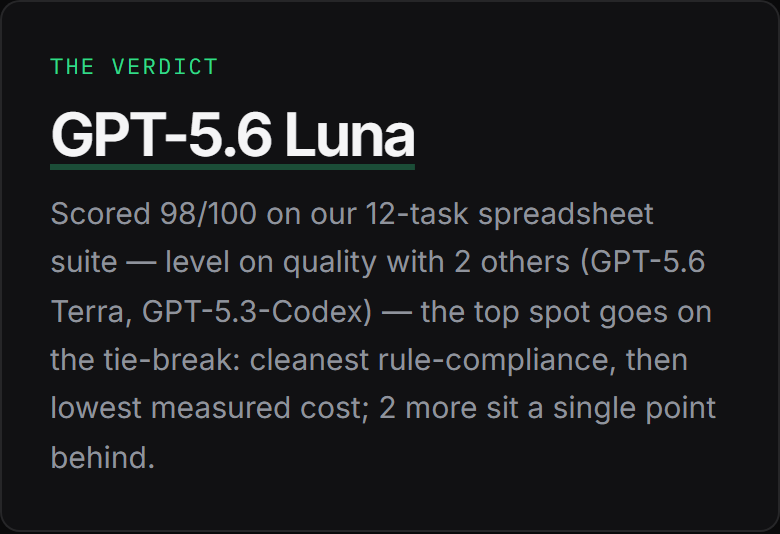
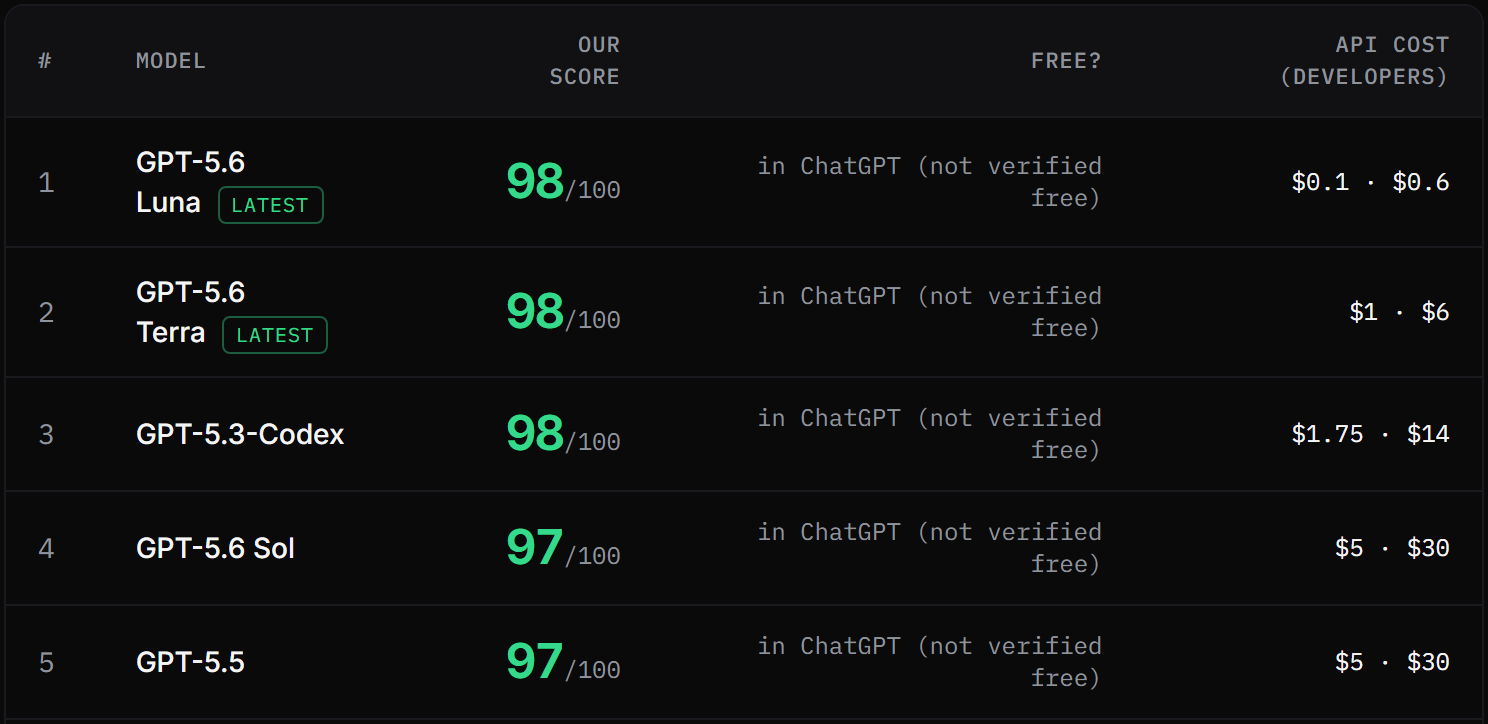
GPT-5.6 Luna tops our spreadsheets & excel board with 98/100 across 12 tasks, marked blind by judges from three rival labs. You do not install it or sign up for anything unusual — it is the engine inside ChatGPT (chatgpt.com) ↗, and the free tier is enough to start.
Already pay for something else? GPT-5.6 Terra (98) and GPT-5.3-Codex (98) came next on the same tasks. 5 of the 19 we tested finished within a single point of the top, so the steps below matter more than which of them you open.
Step by step
- 1
Describe your columns exactly
This is the whole job. The AI cannot see your spreadsheet, so it guesses your layout unless you tell it — and a formula built on a guessed layout returns a wrong number rather than an error, which is worse.
Paste thisI'm in Excel. My sheet has: - Column A: property address (text) - Column B: monthly rent (number) - Column C: date rent received (date, some cells blank) - Column D: date rent was due (date) Rows 2 to 180 have data. Row 1 is headings. I want a formula in column E that says LATE if the rent came in more than 3 days after it was due, PAID if it was on time, and NOT YET if column C is blank. Give me the formula only, then explain it in one sentence.
Say Excel or Google Sheets — they are not the same and some functions only exist in one. Say which row your data starts on. Say when a column can be blank.
- 2
Paste it into ONE cell first
Not the whole column. One cell, on a row where you already know the right answer. If it agrees with you, you have a formula. If it does not, you have saved yourself an afternoon.
- 3
Test it on the awkward rows
Pick three rows deliberately: an easy one, an empty one, and the weirdest one in the sheet. Most formula bugs live in blanks, zeros and dates, not in the ordinary rows.
- 4
Get the error explained instead of guessing
If Excel shows you #VALUE! or #REF! or a wall of green triangles, paste the formula and the error back in. Explaining errors is the thing these models are best at.
Paste thisThis formula is giving me #VALUE! in some rows but not others: [paste your formula here] Column C has dates but some cells are blank and a few contain the text "cash". What's going wrong, and what should the formula be instead?
Tell it what is actually in the awkward cells. "Some cells contain the word cash" is the sentence that solves it.
- 5
Have any formula explained back to you
Inherited a spreadsheet nobody understands? This is the single most useful thing on this page, and it works on formulas nested six deep.
Paste thisExplain what this formula does, in plain English, as if I've never used a spreadsheet: [paste the formula] Then tell me the one thing most likely to break it.
What a good answer looks like
Not a made-up example. This is one of the spreadsheets & excel tasks from our published suite, and what GPT-5.6 Luna actually wrote when it sat it — printed exactly as it was stored, with the mark the judges gave it.
One thing to know before you read it: it was marked against the rules that task sets, which are not the rules on this page. A test suite has to stay identical for every model that sits it, so it cannot adopt the tighter prompt above. Read the answer for the shape of a good one — facts early, constraint respected, a clear next step — not as a template to copy.
In Excel, column A holds order dates and column B holds order values. Write a single formula for cell D1 that totals only the orders placed in the last full calendar month, relative to today's date. Give the formula and one sentence explaining it. Do not use a pivot table or a helper column.
```excel
=SUMIFS(B:B,A:A,">="&(EOMONTH(TODAY(),-2)+1),A:A,"<"&(EOMONTH(TODAY(),-1)+1))
```

This sums order values whose dates fall from the first day through the end of the last completed calendar month.
Judge, marking blind: The formula is perfectly accurate and efficiently calculates the sum for the previous calendar month. The explanation is exactly one sentence, and all constraints are met.
- It gives the formula first and the explanation second — you can paste it and get on with your day
- It handles the blank-cell case rather than assuming every row is filled in, which is where hand-written formulas usually break
- It is checkable: you can put it in one cell and see immediately whether it is right, which is why this board's scores are the most objective on the site
Common mistakes
Uploading the whole spreadsheet and hoping.
Describe the columns instead. It is faster, it works on every AI including the free ones, and it does not hand your tenants' or customers' data to a company you have not read the policy of.
Trusting a formula because it ran without an error.
A wrong formula usually runs perfectly. Check it against a row where you already know the answer — every time, not just the first time.
Asking for "a formula to sort this out".
Say what the answer should be, in words, for one specific row. "Row 7 should say LATE because it came in 5 days after it was due."
Asking it to add up your numbers.
Get it to write the formula and let the spreadsheet do the arithmetic. These models are far better at writing a SUM than at being one.
Why there are no screenshots of ChatGPT here
We do not hold accounts with OpenAI, Google or Anthropic, so we cannot take an honest screenshot of their screens — and building a convincing mock-up of one would be exactly the sort of invention this site exists to argue against. The images above are our own published board, which we can show you every pixel of and which you can check yourself. The steps are written so they work whichever of these tools you open, because the words you type matter far more than the buttons around them.
Questions people ask
Do I need Copilot or an add-on to do this?
No. Everything on this page works by typing into a normal AI chat window and pasting the answer into your spreadsheet. Built-in assistants can be more convenient, but they are not what makes the formula right.
Excel or Google Sheets — does it matter which I say?
Yes, and it is the most common cause of a formula that will not paste. Several functions exist in one and not the other, and Sheets has QUERY and ARRAYFORMULA which Excel does not. Name your program in the first line.
Can I trust it with the numbers?
Trust it to write the formula; do not trust it to do the arithmetic. That is why every task on our spreadsheet board is one where the answer can be checked by looking at it — the formula either works or it does not.
How to summarise a long document with AI
How to get AI to write an email that doesn't sound like AI
All guides → · The tested spreadsheets & excel ranking → · How we test → · Every tool and what it costs →